

Smile 3D Emoji GIF Pack for Mochi Robot – 21 Animated Expressions 128x128
Download a Smile 3D emoji GIF pack with 21 animated 128x128 expressions for Mochi Robot displays, robot face UI, and embedded screens.
Share
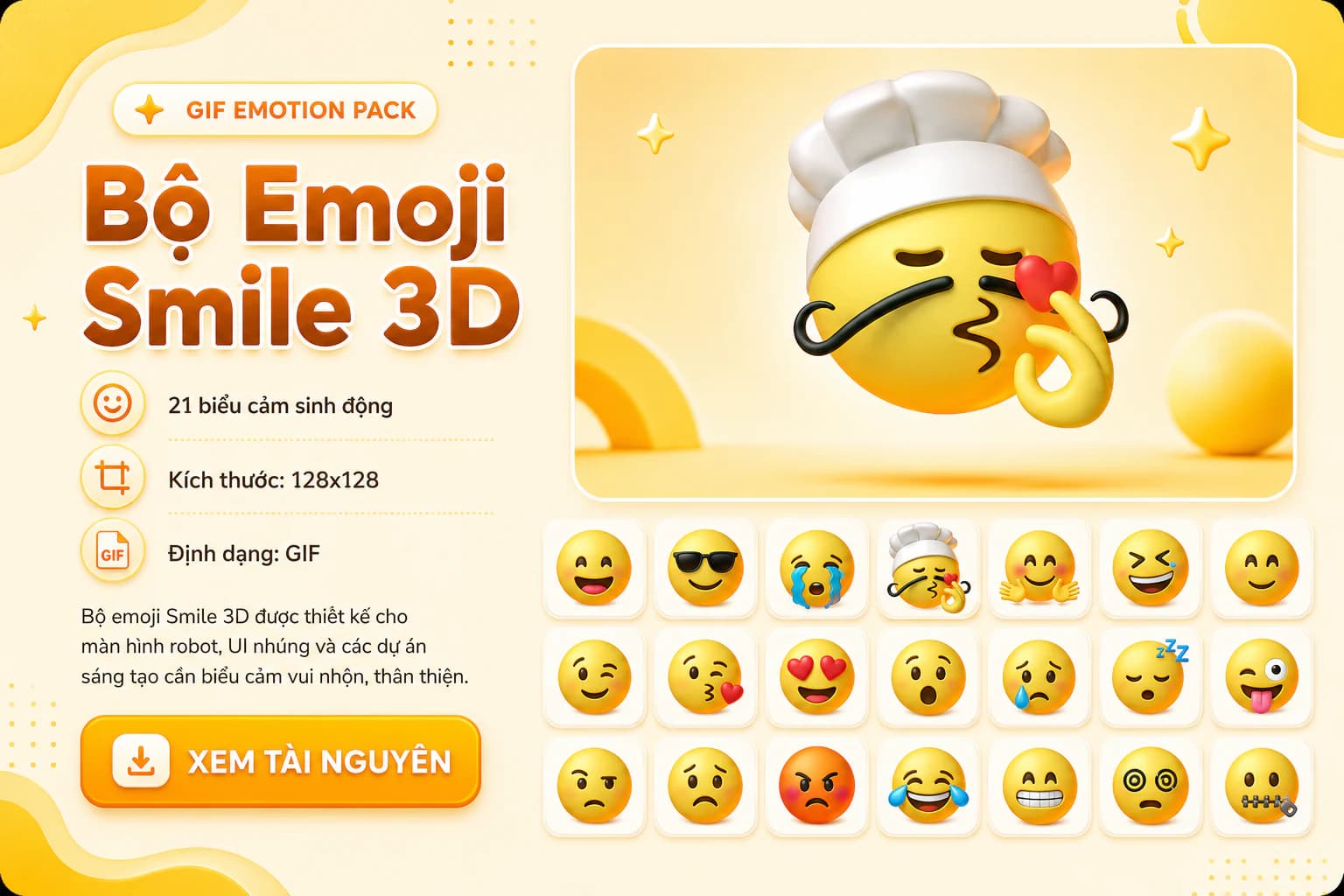
Sample previews
Featured preview
What it is
Smile 3D Emoji GIF Pack for Mochi Robot – 21 Animated Expressions 128x128 is a GIF resource for emotional robot interfaces and embedded displays. Download a Smile 3D emoji GIF pack with 21 animated 128x128 expressions for Mochi Robot displays, robot face UI, and embedded screens. Instead of treating the animations as decoration, use the pack as a set of visual states for product behavior: idle, listening, thinking, talking, happy, sad, error, charging or sleeping.
For Mochi projects, ESP32 displays and small robot UI experiments, the value is speed. You can test whether a character feels readable and friendly before spending time drawing every animation from scratch. Clear expressions also make a prototype easier to understand when the device has very little text, few buttons and limited screen space.
What’s included
- 21 GIF Files
- 128x128 px
- A ZIP download intended for UI asset workflows.
- Expressions that can be mapped to robot UI states, AI companion reactions, smart toy feedback or embedded display demos.
Keep an untouched copy of the original pack, then create a smaller build folder for the expressions used by firmware. This prevents confusion between test files, resized files, optimized files and the final assets loaded onto the device.
How to use
Start with a small core set: idle, blink, happy, listening, thinking, talking and error. Assign each GIF to a specific firmware state or interaction step before adding more personality animations. Without a clear role for each file, a robot face can quickly become a nice-looking folder of assets that is hard to test.
For ESP32 and LVGL projects, test one GIF first on the exact board and display you plan to use. Check file size, frame count, color depth, decode speed and remaining RAM while Wi-Fi, audio or sensor tasks are running. If the animation is too heavy, resize it, reduce frames, reduce colors or move some states to a lighter image format.
After the basic states work, add more expressive reactions. For example, a listening face can appear only after a touch event or wake word, a sleepy face can appear after a timeout, and an error face should be reserved for issues the user actually needs to notice.
Compatibility
This pack is suitable for UI mockups, robot face demos, desktop previews, Raspberry Pi prototypes and ESP32/LVGL projects with enough memory for animation. Match the GIF ratio and resolution to the real display before adding the files to firmware. Avoid scaling large GIFs directly on an MCU when RAM or SPI bandwidth is limited.
For small displays, prefer short loops, readable expressions and low visual noise. For battery-powered devices, keep idle animations subtle so they do not increase current draw too much. If the pack is used in a production-like demo, measure heat, responsiveness and battery runtime rather than judging only by smooth playback on a laptop.
License/notes
No standalone license field is declared in the metadata yet, so check the original download page or source notes before commercial use, public redistribution, or adding the files to a shared asset library. This resource is categorized as Mochi Emoji and its metadata status is Concept.
When sharing a project that uses the GIF pack, record the asset source, resized version and exact expressions included in the firmware build. That makes the interface easier to reproduce, keeps firmware size under control and avoids shipping animations that are no longer called by the state machine.
Related reading
Download Resource
File details & download
- File type
- ZIP
- Version
- Not specified
- File size
- Not specified
- Author
- Not specified
- Original source
- Open original source · drive.google.com
- License
- Not verified
- Commercial use
- Not verified
- Last checked / updated
- Jul 26, 2026
- Tested by Nastrotek
- Not verified
The license has not been verified. Do not assume this resource is free to reuse, redistribute, or use commercially.
Share
Keep exploring
Read next
Related articles
Pika GIF Emoji Set for Mochi Robot – 21 Expressions (360x240)
GIF Pika emoji set includes 21 animated expressions, sized 360x240. Suitable for Mochi Robot screen, robot face UI, AI companion, and other UI projects.
Dansai Emoji GIF Pack for Mochi Robot – 21 Animated Expressions 1440x880
Download a Dansai emoji GIF pack with 21 animated 1440x880 expressions for Mochi Robot displays, AI companions, and embedded screens.
Eyes Emoji GIF Pack for Mochi Robot – 21 Animated Expressions 240x240
Download an Eyes emoji GIF pack with 21 animated 240x240 expressions for Mochi Robot displays, robot face UI, and embedded screens.