

GIF, PNG, JPG, or a C Array: Which Image Format Fits Your ESP32 Screen?
Compare GIF, PNG, JPG, and C array images for ESP32 displays by flash use, RAM use, decode speed, alpha, animation, and quality.
Share
I will help you compare each format by how an ESP32 actually stores, decodes, and sends the image to a display.
Every LVGL asset question eventually turns into the same one: should this image be a GIF, a PNG, a JPG, or just a C array baked into firmware? The honest answer is that no format wins outright — each one trades flash space, RAM, decode time, and visual quality differently, and the right pick depends more on which display and memory budget you're targeting than on the image content itself.
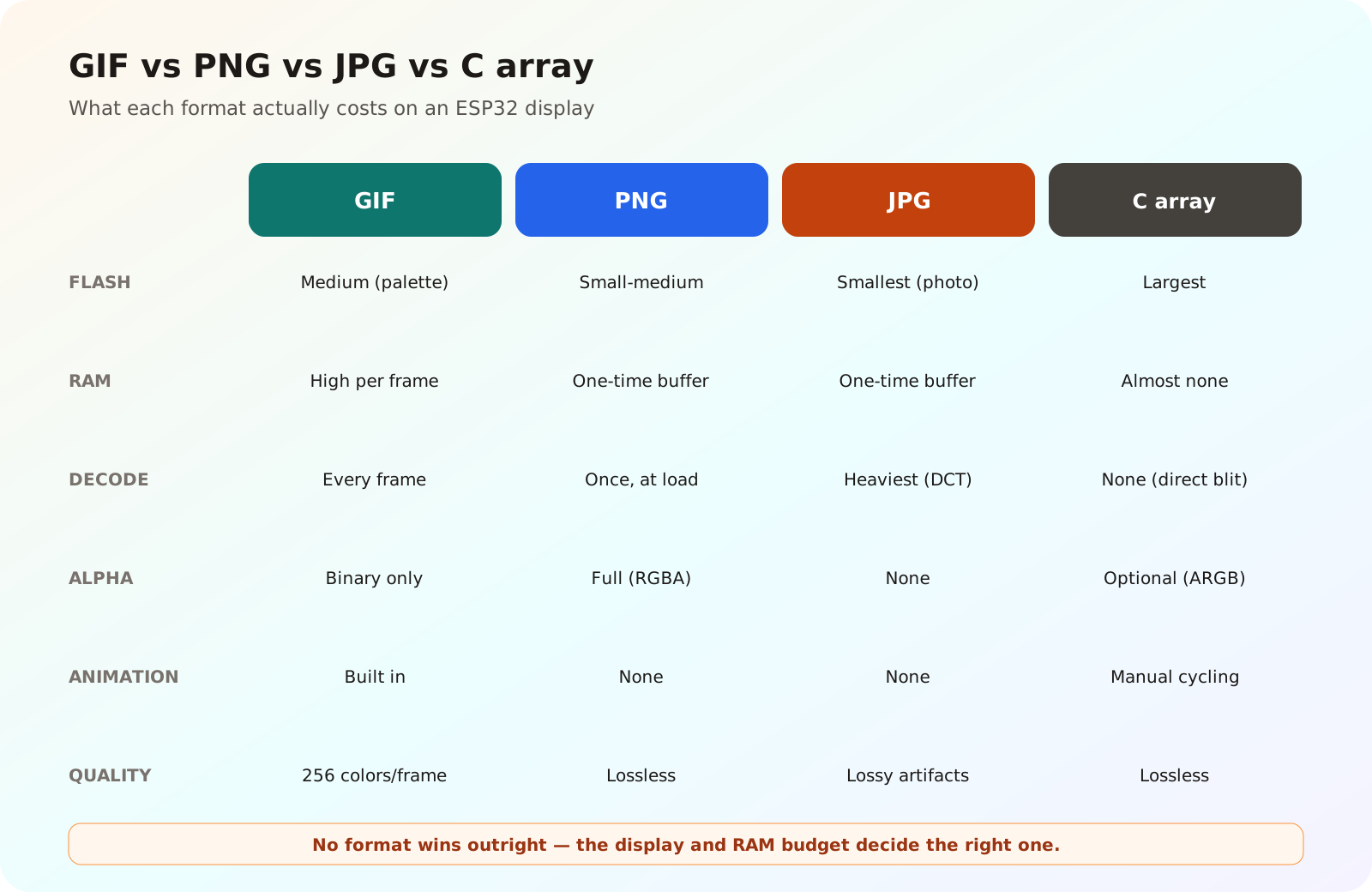
No format wins outright — the display and RAM budget decide the right one.
What "Decoding" Actually Costs
LVGL's image system separates a source image from the decoder that turns it into pixels the display can show. According to the LVGL image decoder documentation, a decoder can work in different ways: it can decode a whole image into RAM up front, decode it line by line while it is being drawn, or in some cases let LVGL read raw pixel data directly with no decoding step at all.
That last case is the compiled-in C array: an image converted ahead of time into raw pixel data (commonly RGB565, RGB888, or an indexed/alpha format) and stored as a const array in flash. There is effectively no runtime decode step, so it is the fastest option to draw and the lightest on RAM, at the cost of taking the most flash space per pixel since nothing is compressed.
Flash and RAM
A raw C array is uncompressed, so it is the largest on flash — a 240x240 RGB565 image is roughly 115 KB before you have written a single line of UI code. PNG compresses well for flat-color, few-tone graphics like expressive faces and icons, so the same artwork often lands well under half that size on flash, but LVGL's PNG decoder needs a working buffer to inflate it into, which costs RAM at decode time. JPG compresses more aggressively for photographic content but less predictably for flat cartoon-style art, and its decoder also needs a working buffer. GIF sits in between on flash — palette-based compression is decent for simple art — but its real cost is RAM: LVGL's GIF decoder keeps a full decoded frame buffer for the current animation frame, sized to the image's pixel area, which is the detail that most often runs a small board out of memory.
Decode Speed
Raw C array: essentially free, since there is no decode step — LVGL blits pixel data almost directly. PNG: a real but usually acceptable cost for static icons and one-time screen changes, dominated by zlib inflate. GIF: paid on every animation frame, not just once, since each frame has to be decoded again before it is drawn — this is the cost that matters most for a face that blinks or talks continuously. JPG: the heaviest of the four in practice. LVGL commonly uses TJpgDec for JPEG decoding, and the tjpgd documentation describes it as a compact decoder built to run within limited RAM — a deliberate trade that keeps memory use low but leaves DCT-based decode work as the main cost, which is fine for an occasional photo but a poor fit for anything redrawn every frame.
Alpha and Transparency
Raw C array formats can include a real alpha channel (ARGB8888 or similar) if you convert the source image that way, giving full per-pixel blending. PNG supports true alpha as well, which is why it is the natural choice for icons and UI elements that need to sit cleanly over a background. GIF only supports binary transparency — one palette index marked fully transparent, no partial blending — which is enough for a simple sprite but will show a hard, aliased edge instead of a soft one. JPG has no transparency support at all; it is always a fully opaque rectangle.
Animation
This is GIF's one clear win: it is the only format here with native multi-frame animation and per-frame timing built in, and LVGL's lv_gif widget plays it directly. PNG and JPG are both single-frame; animating them means either manually swapping images on a timer (effectively rebuilding what GIF already does, without its convenience) or switching frames of a raw C array sprite sheet yourself. A raw C array "animation" is really just your own code cycling through a series of static images — no less real, but it is firmware logic rather than an asset format doing the work.
Quality
Raw C array and PNG are both lossless if you keep the source in a matching bit depth — what you design is exactly what renders, which matters for flat colors, clean line art, and sharp text. JPG is lossy and shows blocky or smudged artifacts around hard edges and text, which is usually visible on the kind of high-contrast, cartoon-style expressions a robot face uses. GIF's limit is its 256-color palette per frame; fine for simple, few-color faces, but visibly banded on anything with smooth color gradients.
Choosing by Display
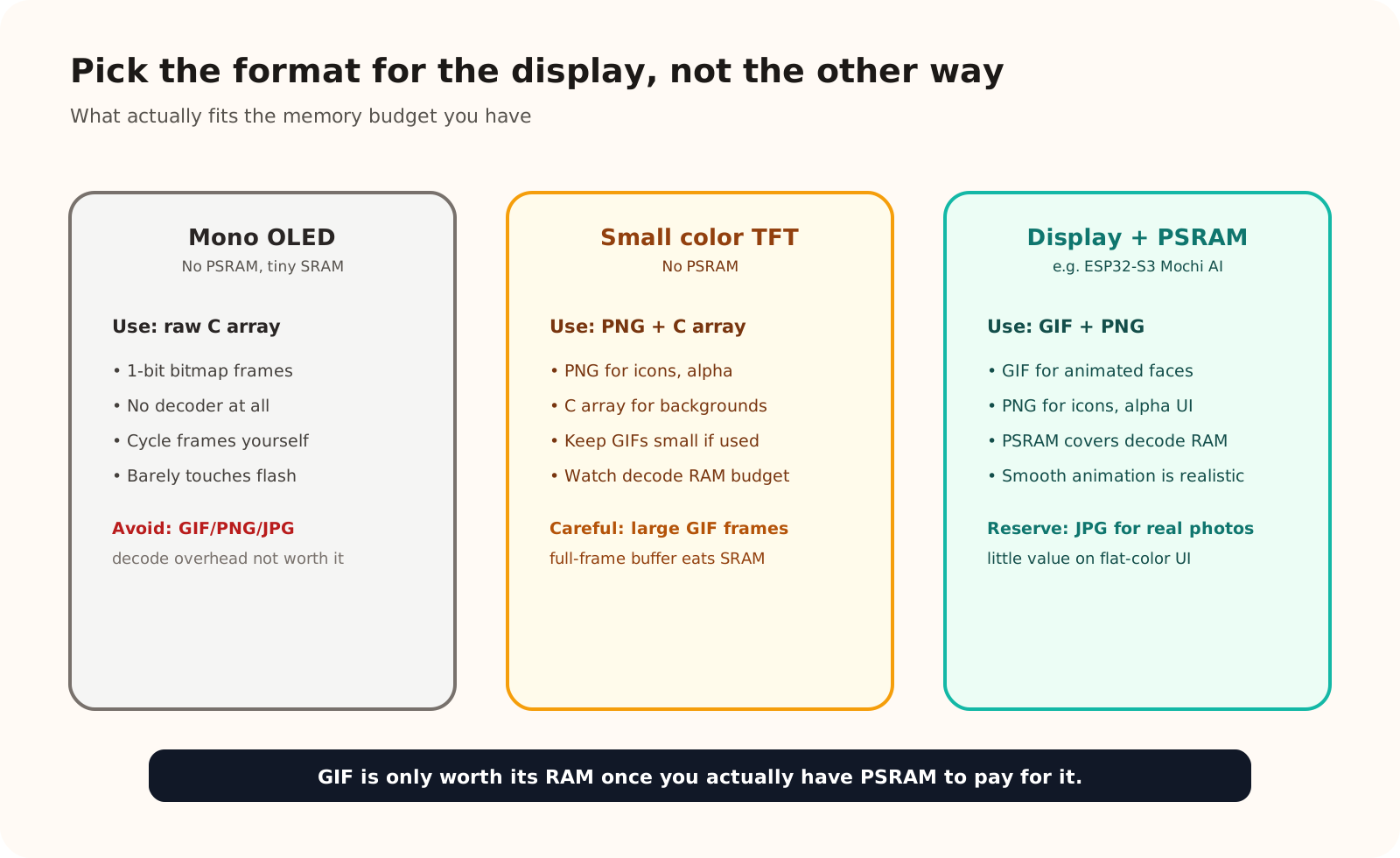
GIF is only worth its RAM once you actually have PSRAM to pay for it.
Monochrome I2C OLED (no PSRAM, e.g. an ESP32-C3 basic build): skip runtime decoding entirely. A small monochrome bitmap converted straight into a raw C array is both the simplest and the cheapest option here — there is no spare RAM for a GIF decoder's frame buffer, and a 128x64 1-bit face barely uses any flash anyway. If you want blinking or a simple animation, cycle a handful of raw bitmap frames yourself rather than reaching for a real animation format.
Small color TFT without PSRAM: lean on PNG for icons and UI chrome that need alpha and only redraw occasionally, and keep large, rarely-changed art (backgrounds, a splash screen) as a raw C array so it draws instantly without eating into your decode RAM budget. Treat GIF carefully here — a full-frame decode buffer at the display's resolution can be a large chunk of a chip's internal SRAM, so keep any animated GIF small in pixel dimensions if you use one at all.
Display with PSRAM (e.g. an ESP32-S3-based Mochi AI build): this is where GIF earns its place. With PSRAM available for LVGL's buffers and the GIF decoder's working memory, animated expressions become practical without starving the rest of the UI. Keep PNG for icons and alpha-blended elements, and reserve JPG for the one case it is actually good at — genuine photographic content — since it brings little to a screen full of flat-color expressions.
Conclusion
There is no universally "best" format — only the format that matches what a given screen can afford. A raw C array is the right default when RAM is the scarce resource and the image rarely changes. PNG earns its decode cost when you need real transparency. GIF is worth its RAM only when you actually need animation and have PSRAM to pay for it. JPG stays reserved for photos, which is a rare need on a small expressive display in the first place.
References
Related reading
Share
Keep exploring
Read next
Related articles
Displaying Expressive GIFs on ESP32 with LVGL
A practical guide to animated GIF expressions in ESP32 firmware: convert assets, enable LV_USE_GIF, store files, and render with lv_gif.
Designing an Emotion State System for the Mochi Robot
Build a Mochi Robot emotion state machine for idle, listening, talking, happy, sad, thinking, and error states with replaceable animations.
What Is Embedded UI, And Why It Matters
What embedded UI means for small devices, why small screens have small budgets, and why it deserves attention as its own discipline.