

AQuality32 - Open-Source ESP32 Air Quality Monitoring Device
Author: Daniel M. Pineda-Tobón, Albeiro Espinosa-Bedoya, John W. Branch-Bedoya
Open-source AQuality32 ESP32 PCB for battery-powered CO2, particulate matter, temperature, and humidity monitoring, validated in HardwareX.
Main components
Share
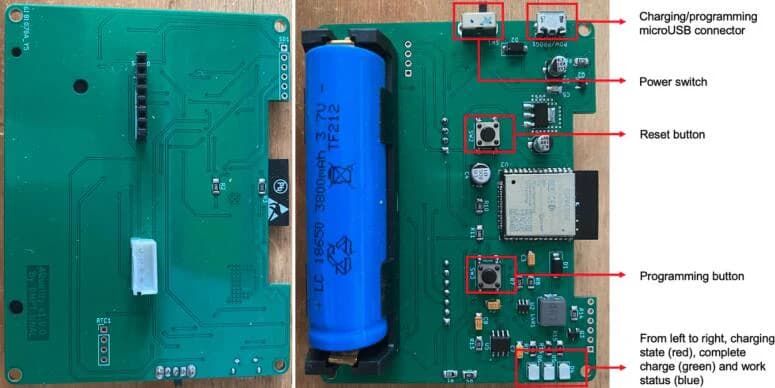
PCB photos
Quick Specs
- Main IC
- ESP32-WROOM-32E SoM
- Status
- Concept
What it is
An open-source, battery-powered air quality monitor built around an ESP32 SoM, designed by researchers at Universidad Nacional de Colombia as an affordable alternative to commercial monitoring equipment for small research teams. It measures CO2, PM1/PM2.5/PM10 particulate matter, temperature, and relative humidity, and logs data to Google Sheets over WiFi via Google AppScript. The design, BOM, and validation data were published as a peer-reviewed article in HardwareX.
Main components
- ESP32-WROOM-32E SoM (WiFi/Bluetooth)
- SCD30 CO2 sensor (Sensirion), connected via a 7-pin header
- HM3301 particulate matter sensor (Seeed Grove Laser PM2.5, PM1/PM2.5/PM10)
- TP4056 LiPo battery charger for an 18650 cell
- AMS1117 3.3V LDO regulator and a boost converter for the sensor/logic rails
- microSD card slot, RTC/AUX I2C expansion headers
- Power switch, reset button, and a dedicated programming button
What you can use it for
- Portable or stationary air quality monitoring for research, either indoors or outdoors
- Logging CO2/PM/temperature/humidity data to Google Sheets with a simple web dashboard
- A reference design for a battery-powered ESP32 sensor node with an external-programmer UART interface (no onboard USB-serial chip)
Notes before use
- Nastrotek has not independently fabricated or tested this board yet.
- The upstream authors report real-world validation: a 70-hour field consistency test and side-by-side urban/industrial site measurements against a commercial GPS unit — see the published paper for the full results.
- There is no onboard USB-to-serial chip. Programming requires an external USB-to-TTL (FTDI) adapter wired to GND/TX/RX at 3.3V logic levels, with the device held in programming mode via its dedicated button while powering on.
- Hardware design files are licensed GPL (per the paper's hardware metadata table); the published paper's text and figures are CC BY 4.0.
- The full bill of materials, including DigiKey part numbers and per-unit costs (~$170 total), is published as a table in the paper rather than as a separate spreadsheet.
Source / reference
Original hardware design by Daniel M. Pineda-Tobón, Albeiro Espinosa-Bedoya, and John W. Branch-Bedoya (Universidad Nacional de Colombia), published in HardwareX (DOI: 10.1016/j.ohx.2024.e00607), design files archived on OSF.
Figures from the paper are attributed to the authors above under CC BY 4.0. Nastrotek resized the images for web delivery without changing their technical content.
How to evaluate this board
Read this resource as a starting point for review, not as a board you should manufacture blindly. Open the schematic first and identify the power input, regulator path, MCU or main controller, external connectors, programming interface, and any sensor or display interfaces. Once the functional blocks are clear, it becomes much easier to decide whether the design matches your project.
For AQuality32, the review should focus on sensor placement and calibration access as much as normal ESP32 checks. Keep heat-generating parts away from temperature and humidity sensing, confirm airflow around the particulate and CO2 sensors, inspect battery/charger routing, and make sure the board can still be logged, programmed, and serviced after it is inside the enclosure.
Before reusing the files
- Check the license and original author notes.
- Confirm voltage levels before connecting external modules.
- Verify connector pinout against your cables and sensors.
- Review BOM availability before ordering PCBs.
- Export fresh Gerbers from the design tool if you modify anything.
- Treat untested designs as references until you have fabricated and measured them.
Good use cases
This kind of resource is useful when you want to study a real open-source hardware design, borrow part of a circuit, or compare layout decisions before creating your own board. Even if you do not fabricate the PCB directly, the schematic can still be valuable as a reference for power design, connector planning, enclosure constraints, or firmware bring-up.
For a small product prototype, the best workflow is to reuse ideas carefully: copy the principle, not the entire board without context. Mark what you changed, keep notes on assumptions, and add measurement points so the first fabricated board can teach you something useful.
Related reading
Download Resource
File details & download
- File type
- Design File
- Version
- Not specified
- File size
- Not specified
- Author
- Daniel M. Pineda-Tobón, Albeiro Espinosa-Bedoya, John W. Branch-Bedoya
- Original source
- Open original source · osf.io
- License
- Not verified
- Commercial use
- Not verified
- Last checked / updated
- Jul 31, 2026
- Tested by Nastrotek
- Not verified
The license has not been verified. Do not assume this resource is free to reuse, redistribute, or use commercially.
Share
Keep exploring
Read next
Related articles
GPT-6 Astra and the Future of PCB Design: Speed Up or Replace Engineers?
How far can GPT-6 Astra go in KiCad? An independent look at the demo, EEBench, open-source tools, and why routing a board is not the same as making it production-ready.
Net Classes and Trace Width: When Should a PCB Trace Be Wider?
A practical guide to PCB net classes and trace width for small boards: signal traces, 3V3, 5V, battery paths, ground, power vias, and a pre-Gerber checklist.
PCB Ground Planes: GND Is More Than a Net Name
A practical guide to PCB ground planes, return current, GND layout mistakes, stitching vias, decoupling paths, and copper pour checks.